


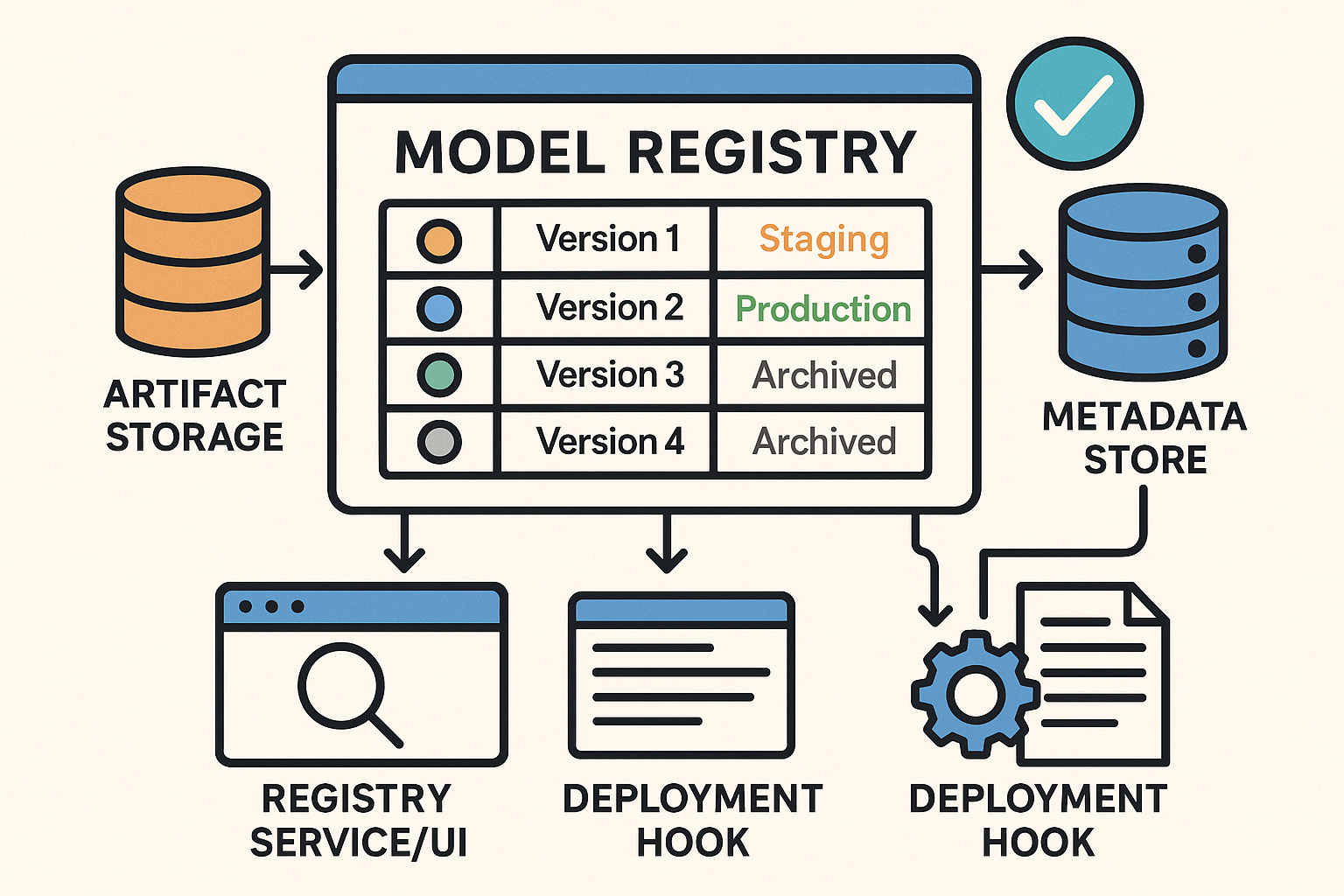
In the last post, we pulled pretrained models from public hubs and got results fast. Great for demos. But when you’re running multiple projects, retraining variants, and handing models between teams, you need something sturdier: an internal model registry. Think of it as a single place to track what models you have, which data trained them, which version is in production, and who owns what.
What a Model Registry Actually Does
- Stores artifacts (the model files) in a predictable location.
- Versions models so every retrain becomes a new version you can roll forward/back.
- Keeps metadata: dataset version, code commit, metrics, owners, licenses.
- Marks stages: “staging”, “production”, “archived”.
- Enables discovery: search “image classification” and see what already exists.
Why Even Small Teams Should Care
- Stop duplicating work—reuse proven baselines instead of starting from zero.
- Faster delivery—promote a known-good version to production in minutes.
- Governance—know which data and code created which model, and who approved it.
- Future-proof—when staff rotates, the models (and their lineage) don’t vanish with them.
The Minimal Architecture (Keep It Simple)
- Artifact Storage: an object store (S3/Blob/GCS) or even a network drive for small teams.
- Metadata Store: a database (PostgreSQL is fine) that records name, version, metrics, dataset, code hash, owner, stage.
- Registry Service/UI: lightweight tooling to register, browse, and promote models.
- Deployment Hook: a script or CI job that reads “production” versions and deploys them.
Quick Start: A Lightweight Path
If you want something you can stand up quickly, use an off-the-shelf registry. MLflow Model Registry is popular and open source. You log a model after training, register it with a name, and assign a stage like “Staging” or “Production”. Public hubs (Hugging Face Hub, TensorFlow Hub, PyTorch Hub) are still fantastic for discovery and baselines—your internal registry is where you track your versions of those models.
Example: Registering a Model in MLflow (Python)
# pip install mlflow

import mlflow
import mlflow.sklearn

# 1) Train your model (placeholder)
from sklearn.ensemble import RandomForestClassifier
model = RandomForestClassifier().fit(X_train, y_train)

# 2) Log model to MLflow
with mlflow.start_run():
    mlflow.sklearn.log_model(model, artifact_path="model")
    run_id = mlflow.active_run().info.run_id

# 3) Register the logged model under a stable name
model_uri = f"runs:/{run_id}/model"
registered = mlflow.register_model(model_uri=model_uri, name="fraud_detector")

# 4) (Optional) Transition the newest version to 'Staging' or 'Production'
client = mlflow.tracking.MlflowClient()
client.transition_model_version_stage(
    name="fraud_detector",
    version=registered.version,
    stage="Staging"  # or "Production"
)
What Metadata Should You Track?
- Identity: model name, version, owner, purpose.
- Lineage: dataset version/path, feature pipeline version, code commit hash, training run ID.
- Metrics: accuracy/F1/AUC (and a link to full eval reports).
- Operational: stage (dev/staging/prod), last promoted date, serving endpoint, rollback target.
- Compliance: license, PII usage notes, risk flags, bias/fairness notes.
Simple Team Workflow
- Before training, search the registry for an existing baseline.
- Train and evaluate; log & register the new version.
- Attach metrics, dataset/code references, and an owner.
- Promote to Staging for integration tests; then to Production with an approval.
- Monitor performance; if it drifts, retrain and register a new version, then promote.
Common Pitfalls (and Safe Defaults)
- Dumping ground: Require a few key fields (dataset version, metrics, owner) before allowing “Production”.
- No integration: Add a tiny CI step that auto-registers models after training jobs.
- License confusion: Record upstream model/data licenses in metadata before you ship.
Where to Learn More (and Borrow)
These official docs and hubs are great references for registries and pretrained models:
- MLflow Model Registry – Official Docs
- MLflow Model Registry – Quickstart
- Databricks Docs: Register & Manage MLflow Models
- Hugging Face Hub – Overview & Model Cards
- Hugging Face Hub – Repositories
- TensorFlow Hub – Pretrained Models
- PyTorch Hub – Docs
Next Up
In the next installment, we’ll wire the registry into CI/CD so promotions to “Production” can auto-deploy a new serving endpoint with a rollback plan.


❓Why not just use GitHub for model versioning?
Great question — and we’ve heard it more than once.
GitHub is excellent for code. But ML models are large binary artifacts that need much more than basic version control. Here’s what you don’t get with GitHub alone:
GitHub Model Registry
✅ Code tracking ✅ Artifact + code + data lineage
⚠️ Poor large file support (LFS) ✅ Handles huge models easily
⚠️ No metadata structure ✅ Track metrics, owners, datasets
⚠️ No staging/production concept ✅ Native model promotion + rollback
⚠️ Manual search + discovery ✅ API + UI for queries
⚠️ No deployment integration ✅ Hooks for CI/CD and serving systems
GitHub + Git LFS might work if you’ve got one model, one developer, and no deployments. But once you’re managing versions, teams, or production workflows, a proper model registry saves you from chaos.
💡 Pro tip: Use both.
Code lives in GitHub.
Models and their lineage live in your registry.